 Snotra
Stop re-explaining
your work to AI.
Snotra is a Mac browser that keeps tabs organized by context and gives AI memory of pages you've actually opened — with sources.

Context browser
Tabs, memory, and chat scoped to what you're doing right now.
Private memory
Saved per context on your Mac — work and life stay apart.
AI partner
Sidebar AI that remembers and understands your context.
[ 01 / 05 ]·Product//Building blocks
Sound familiar?
Four everyday frictions when the browser and AI live in separate worlds — and nothing remembers your context for you.
Too many tabs, one endless list
Planning a trip, comparing contractors, writing a proposal, onboarding at a new job — if your browser holds the real work but AI only sees what you pasted into a chat, Snotra is for you.
Copy-paste is your memory
To summarize a page or keep context, you lift text and links into a separate AI chat. What you read stays in the browser; what AI knows lives in the clipboard.
One thread, not your whole research
In ChatGPT or Claude, context lives in one thread — enough for a few days of chat, but research spreads across tabs, sites, and projects. Eventually you're scrolling old messages or pasting links again, because the reading never lived in the chat.
No safe line before AI sees your data
You paste a client form — name, address — into ChatGPT beside banking and health tabs. You can't tell what's blocked, anonymized, or kept on your Mac before it leaves for the cloud.
One browser — context and memory built in
Six parts, one browser
Snotra is not a chat box glued to Chrome. Each layer below is a first-class part of one app — scoped to your active context and visible on screen.
Contexts
Named workspaces with color tags. Each context owns its tabs, chat history, and page library — switch context, switch everything.
Native browser
Real Mac browsing: address bar, tabs, back/forward, find-in-page, translation. Fast tab switching without reloading the page you left.
Page library
Text from pages you save or allow to remember — searchable, tied to one context. Find that hotel listing or policy PDF from two weeks ago by what you read inside it.
Personal memory
Facts about how you work — preferences, context details, recurring topics. Stored locally, searchable, editable. You see exactly what AI can use.
Context-scoped AI
Sidebar chat that belongs to the active context. Questions pull from your page library and open tabs — not a blank session that forgot yesterday.
Context briefing
Before each answer, Snotra gathers what matters on your Mac: your active context, open tabs, matching saved pages, personal facts, and recent chat — fresh each time, so nothing stale carries over.
[ 02 / 05 ]·Product//Differentiation
What makes Snotra different
You don't need another AI tab lost in the clutter. You need a browser where memory, contexts, and sources are the product — not an add-on.
Memory from pages you opened
Not a chat tabGeneric AI knows the internet. Snotra knows your research — indexed per context, retrieved when you ask, cited in the answer. No copying URLs into a separate chat before every question.
Contexts with AI memory, not only tabs
Not just spacesWorkspace browsers organize tabs. Snotra adds a page library, personal facts, and an assistant that reads both — still isolated per context so work and side contexts never mix.
Search the content, not the link
Not bookmarksBookmarks save URLs. Snotra saves what you actually read — searchable by title, address, or a phrase inside the page, even when you forgot where you saw it.
Privacy you can audit
Not a black boxSensitive sites blocked by default. Toolbar shows saved, blocked, or skipped. Personal memory is a panel you edit — encrypted on your Mac before anything optional goes to the cloud.
[ 03 / 05 ]·Product//Benefits
What you gain
Concrete outcomes for people who live in the browser — not a feature checklist.
Stop restarting context every time
Contexts, tabs, chat, and saved pages survive restarts. Pick up Monday where you left Friday — without rebuilding a brief for AI from scratch.
Keep contexts separate
Vacation planning doesn't leak into your day job. Search and AI only see the active context — on purpose, not because you wrote a careful prompt.
Trust answers with links
Claims point to a page you actually opened. When your library has nothing relevant, Snotra says so instead of inventing — traceability over fluent guessing.
Own your memory
Save pages manually or allow remembering per site. Edit or delete personal facts. Allow a bank site once — or never. Memory is a panel you control, not a hidden profile.
Fast when it matters
Search your saved pages offline. Quick questions stay quick. When you're off Wi‑Fi, answers can still draw on what's already on your Mac.
One window for the whole project
Context rail, browser, and AI sidebar in one place — no alt-tabbing between apps while you compare quotes, read pages, and ask questions.
[ 04 / 05 ]·Product//Memory flow
How information flows
Everything happens inside a context. You browse the web as usual — memory builds quietly, and AI reads from the same library you do.
- Contractor A quote
- Budget cap · €12k
- Start · July
- Compare sheet
Sources · contractor-a.com · contractor-b.com
- Contractor A quote
- Budget cap · €12k
- Start · July
- Compare sheet
Sources · contractor-a.com · contractor-b.com
One closed loop per context: you browse, pages are indexed on your Mac, the sidebar searches that library first, and every answer links back to a page you opened.
- 01
Pick a context
A movie night, a remodel, or a trip — each gets its own tabs, chat, and page library. Switch context, switch everything.
- 02
Read on the web
Browse normally inside Snotra. Pages you save or allow to index become searchable text — only in this context.
- 03
Memory on your Mac
Summaries and personal facts stay local. Search works offline. Other contexts never see this library.
- 04
Ask the sidebar
AI searches your context memory and open tabs first — not a blank chat that forgot what you read yesterday.
- 05
Answers with sources
Replies cite pages you opened. If your library has nothing relevant, Snotra says so — it won't invent sources from the internet.
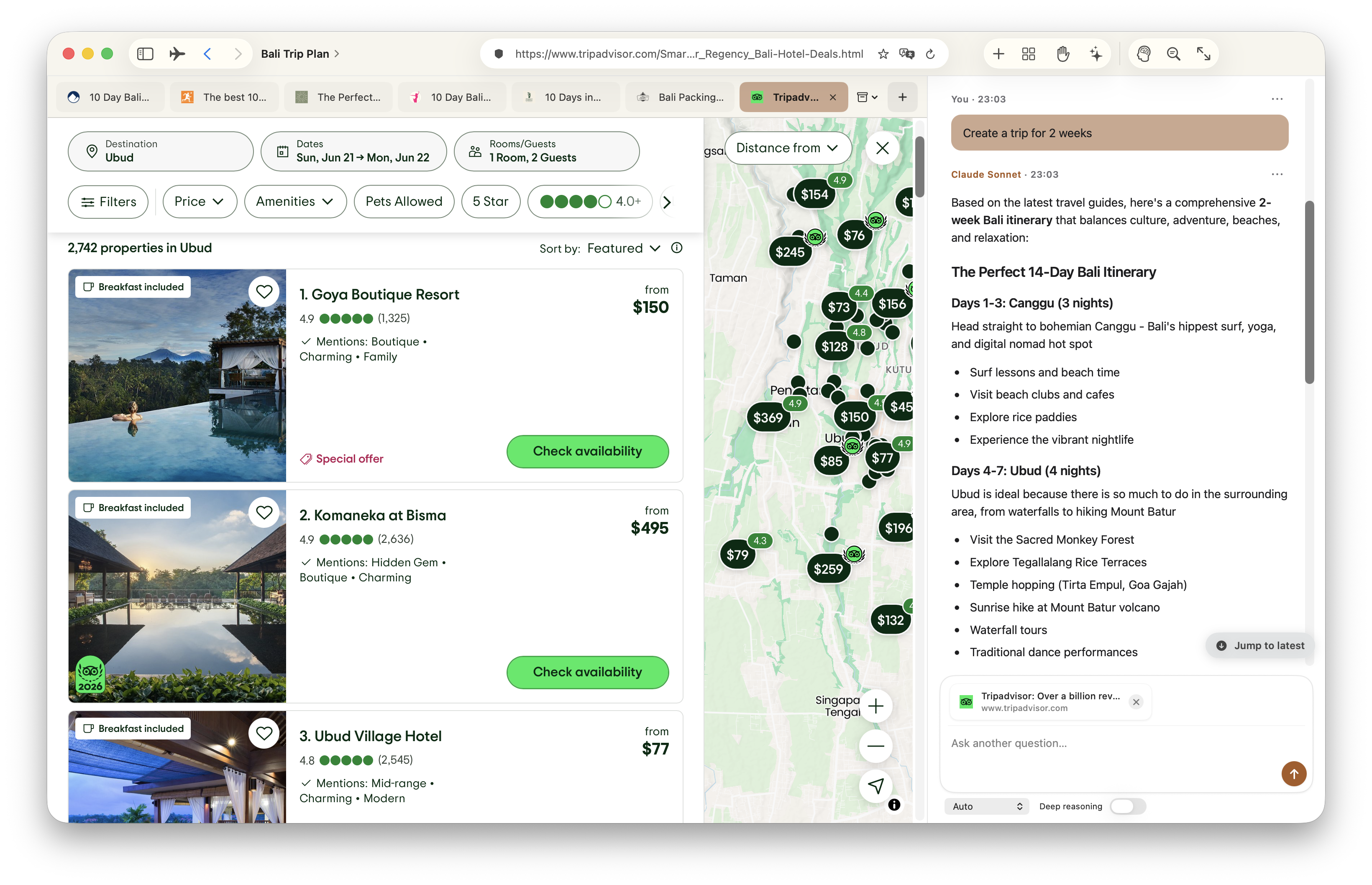
For anyone juggling more than one thing at a time
Planning a trip, comparing contractors, writing a proposal, onboarding at a new job — if your browser holds the real work but AI only sees what you pasted into a chat, Snotra is for you.
Updates//Journal
Building in the open
Newest first — what we shipped, how your data is handled, and how memory in the browser is getting better. Plain language, no hype.
First invites go out
Public beta for Mac: separate contexts, memory of pages you read, AI answers with links, a panel for your own facts, and a way to bring tabs over from your old browser. Invites go out in small batches — we'd rather onboard carefully than rush. If you're on the list, watch your inbox.
Email confirmation for the waitlist
Email confirmation is now part of joining the waitlist: one click from waitlist@snotra.app secures your place in the queue. A follow-up message shares your position and a personal referral link. We only send to addresses that opted in — from our verified domain, with consistent transactional templates.
- LCRLCR
Presentation modes for browsing
Choose how much of the browser UI you see — full window for reading, balanced layouts for research, or minimal panels when the page should take center stage. Memory and tabs stay the same; only the window frame adapts to how you're working.
Encrypted backups on your Mac
Browser state can be backed up locally with encryption before anything syncs. Memory settings spell out what stays on device versus what can sync — fewer surprises about where your tabs and summaries live.
- ⌕⌕
Local search before the cloud
When AI needs passages from saved pages, Snotra searches chunks on your Mac first. Cloud hybrid search still helps on hard questions — but everyday recall starts local, so answers stay fast and your reading list doesn't leave the device by default.
- A→ЯA→Я
Translation that respects the page
In-page translation reads declared language tags on the page and picks better source/target pairs. Less guessing when a site labels itself — cleaner swaps between originals and translations, and memory keeps the language you actually read.
#
queue
#
queue
Early access opens
This site and the waitlist are live. We're not inventing a launch date — we're opening the queue and inviting people as daily use holds up. The memory stack below is already in the app; early access is about proving it survives real research workflows, not demo slides.
- TabsPagesFactsTabsPagesFacts
Intent-aware prompts
Before every answer, Snotra figures out what you actually need — a tab list, a saved page, personal facts, or a deep dive across everything you've read. Simple questions no longer wade through your whole library. Less noise, sharper replies.
- ✓✓✓✓✓✓✓✓✓✓✓✓
Tested before it ships
Sign-in flows, translation, tab switching, and chat sends are checked automatically. Memory gets the same discipline: contexts stay separate, long chats don't break, and questions that span several tabs still find the right pages.
- ++
Smarter search across saved pages
Saved pages are broken into passages you can search by keyword or meaning. When your question touches two tabs — say, flights and hotels — both sides can surface in one answer.
- A→ЯA→Я
Translate pages in place
Read articles in another language without leaving the page. Pick a language from the address bar, translate in place, revert in one click. What you saved for memory stays in the language you actually read.
- ⌘123⌘123
Shortcuts for daily browsing
Jump between contexts and tabs from the keyboard, find text on a page, show or hide sidebars. Feels familiar if you already use Safari or Chrome — with memory that follows the context you're in.
trip · dates · May 12–19
trip · dates · May 12–19
Personal memory you control
Facts about you live on your Mac — preferences, standing plans, how you like summaries. Search, edit, or delete any entry; optional cloud sync only if you turn it on. Wipe a fact and it stays gone. Nothing hidden in a profile you can't open.
- rolluprollup
Long threads, trimmed honestly
Long chats compress into summaries on your Mac so threads stay usable. Optional fact capture only when you want it — uncertain guesses don't get saved. Recent messages stay word-for-word; older ones fold into a short recap instead of disappearing.
- AIsrcAIsrc
Answers with sources
Answers show where each point came from — page title, link, and a short quote. If your context has nothing useful, the assistant says so instead of inventing. Lisbon planning never pulls pages from your work context.
- PTRPTR
A briefing before every Send
The assistant doesn't remember yesterday's session for you — each send gathers fresh context on your Mac: who you are in settings, which context is active, open tabs, the page you're on, the best matching saved passages, personal facts, and recent chat.
- bankblockbankblock
Careful by default indexing
Banking, checkout, health, and government sites skip memory unless you explicitly allow them. Very short pages and video players are skipped too. The toolbar always shows why — waiting, saved, blocked, or skipped — and you can allow one site without changing everything else.
- ⌕⌕
Search what you saved
Find a page by title, URL, or text inside it — scoped to the current context. Works offline against local summaries when cloud search is unavailable. The article from two weeks ago is one query away, not buried in bookmarks.
Readable text, not screenshots
Memory stores the readable text from a page — not a screenshot. Save from the toolbar, or let Snotra remember after you've been on a page for a moment when the site allows it. Status is always visible: saving, saved, not saved, or blocked.
Find the right paragraph
Long articles are split into passages so search lands on the paragraph you care about, not just the headline. Summaries stay on your Mac so the same page isn't re-read from scratch every time.
- TabsPagesTabsPages
Two layers of persistence
Tabs, contexts, and chat are saved as you go. Page summaries, visit history, and personal facts live in a local store on your Mac. Restart, crash, Friday quit — Monday reopen picks up the same context, tabs, and library.
Keys in Keychain, encrypt before cloud
Passwords and keys stay in the Mac Keychain — not in plain files. Anything that might sync to the cloud is encrypted on your Mac first. Personal facts you save are visible in the app — searchable, editable, deletable.
- ◀▶https◀▶https
A real browser underneath
Address bar, back and forward, tabs that don't reload when you switch. Sign-in popups and bank flows work without breaking the tab you started from. We wouldn't ship AI on a browser we wouldn't use for our own planning and research.
Contexts, not tab chaos
Named contexts with color tags — each has its own tabs, chat, and saved pages. Switch from "Kitchen remodel" to "Trip to Lisbon" and nothing crosses over. Isolation is deliberate, not an accident.
- LCRLCR
Three columns, one window
Contexts on the left, the web in the center, AI on the right — one window for a full day. Memory only works when browsing and chat share the same context; splitting apps broke that from day one.
- ??
The question we started with
Arc was gone. A chat can hold a few days of back-and-forth — but our work lived in tabs, bookmarks, and separate projects, not in one thread. In April we started asking: what if the browser remembered each context and the pages you actually read — and AI answered from there with links, not pasted summaries?